How to Transcribe Audio to Text in Your Browser
By Free Audio Editor · · How we test
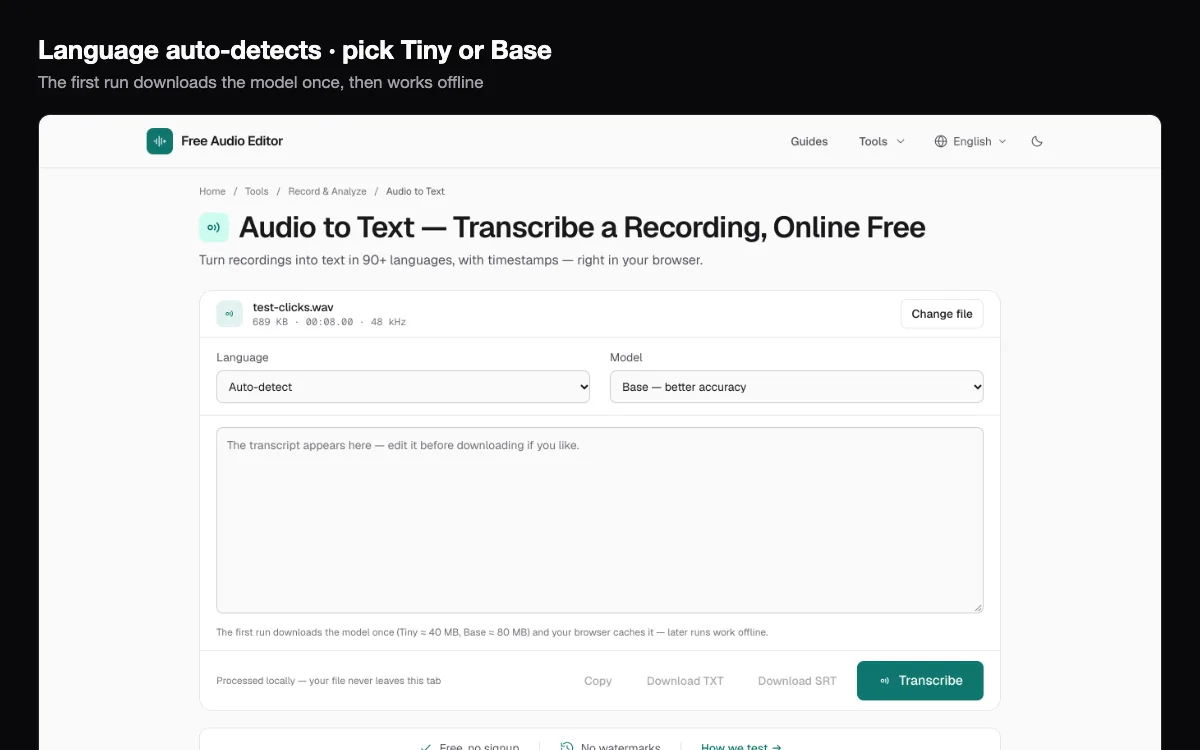
The interview is recorded, the episode is due, and the show notes will not write themselves. Transcribing by hand costs about three minutes per minute of tape, which is why it never happens. The audio to text page runs a Whisper model in the browser tab, on your device, and hands back editable text or an SRT file with timestamps. The audio never reaches a server, so a source that is not public yet is safe to transcribe here.
Before you drop the file
- Formats: MP3, WAV, M4A, and video files all work. The file is decoded on your device.
- Length: each recording is capped at about 10 minutes. A longer interview gets cut into sections first; the audio trimmer or the silence remover makes quick work of that.
- The model download: the first transcription downloads the model once, from a public CDN. The browser caches it, and after that the transcription itself runs offline. The audio is never uploaded at any point.
- Language: about 90 languages, detected automatically when you are not sure which one the file is in.
Transcribe a recording
- Drop the file, or several. Multiple recordings share the language and model settings and run one after another; two or more come back as a ZIP of TXT and SRT files.
- Pick the language. Auto-detect handles most files; set it manually when the recording opens with music or noise that confuses the detector.
- Pick the model. Tiny is faster and lighter, the right call for long recordings or an older device. Base is the accuracy pick when the tape is the final word.
- Wait out the transcription. A 10-minute section takes a few minutes on a laptop; a phone is slower and runs out of memory sooner.
- Edit the transcript in the box. Fix the names the model guessed at, then save as TXT for show notes or SRT when timestamps matter.
The model choice, side by side:
| Model | Best for | Trade-off |
|---|---|---|
| Tiny | Long recordings, older or low-memory devices | Faster and lighter; more mistakes on noisy tape |
| Base | Interviews and anything you will publish | Slower, needs more memory; noticeably fewer errors |
Which export, which job
TXT is the working copy: show notes, pull quotes, a searchable record of a meeting or a lecture. Read it once against the tape and fix the proper nouns; Whisper is strong on sentences and weak on the spelling of names.
SRT is the caption file: each line carries timestamps, so it drops straight into a video editor or a podcast video. Cut the recording before transcribing if the captions should match a trimmed cut, not the raw tape.
What an SRT actually looks like
An SRT file is numbered blocks, each with a start and end timecode and the line spoken in that span:
1
00:00:01,000 --> 00:00:04,200
Welcome back to the show.
That structure is why it drops straight into a video editor or a player’s subtitle track: every line knows when it was said. If you trim the recording after transcribing, the timestamps shift and the SRT needs a new export, so cut first, transcribe second.
Reading the transcript against the tape
Budget ten minutes of checking for an hour of tape, spent where errors cluster. Proper nouns come first: people, companies, and place names are where the model guesses a plausible spelling. Numbers come next, because “fifteen” and “fifty” blur in fast speech. Homophones are the rest: “their” and “there”, “site” and “sight”. Fix those three classes and the transcript is publishable.
Accents and noisy openings are the accuracy variables. Auto-detect reads the first stretch of the file, so a track that opens with forty seconds of music before anyone speaks gives the detector less to work with; set the language manually in that case.
Mistakes that waste a transcription
- Transcribing the raw tape with twenty minutes of dead air. The model spends its time on silence. Run the silence remover first and the transcript comes back cleaner and faster.
- Expecting speaker names. The transcript is the words, not a formatted script. Label the speakers yourself when you edit, or ask guests to state their name on tape, which gives the edit an anchor.
- Tiny on a mumbled phone recording. The small model earns its speed on clean audio. When the take is rough, Base costs a few extra minutes and buys back the accuracy.
- Deleting the audio after the TXT lands. Keep the tape until the notes are published; a quote you cannot verify against the recording is a liability.
Where transcription fits in the workflow
Record the take in the voice recorder, trim the ends, transcribe the sections, and write the notes from the TXT. The reverse job exists too: if you have a melody and want notes instead of words, the audio to MIDI converter reads pitch, not speech.
Sources
More hands-on walkthroughs in all guides.