What Is Audio Bitrate? What 128 vs 320 kbps Changes
By Free Audio Editor · · How we test
Bitrate is the number of bits a second of audio spends, measured in kbps. A 320 kbps MP3 spends 320,000 bits on every second; a 128 kbps MP3 spends 128,000. That single number decides the file size, and for lossy formats it is the clearest statement of how much detail survived the encode. The bitrate converter changes the number on an existing file, and this page is about choosing it on purpose.
What the number changes
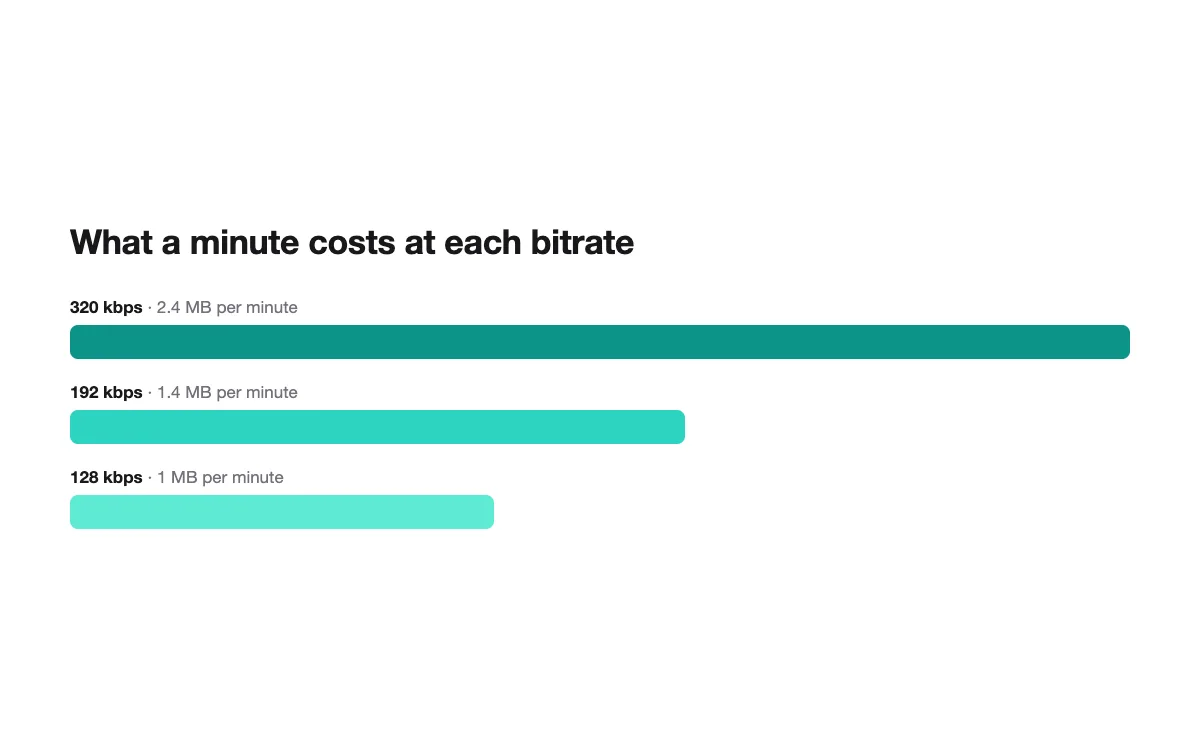
Three things move with bitrate. Size moves linearly: 128 kbps is about 1 MB per minute, 192 about 1.4, and 320 about 2.4, so a ten-hour audiobook at 128 kbps fits in roughly 575 MB. Fidelity moves with it, in the parts of the music that encoders spend few bits on: cymbals, reverb tails, and dense full-band moments show damage first. Compatibility barely moves at all, because every device that plays audio plays every common bitrate.
What the number does not change
Bitrate is not volume, not speed, and not pitch. A quiet file at 320 kbps is still quiet, and a 100 BPM track is still 100 BPM at any rate. It is also not a repair tool: raising the bitrate of an existing MP3 spends more bits on the audio that survived the first encode, and the information the encoder threw away stays gone. A 64 kbps file re-encoded at 320 is a big file with small content.
The common numbers
- 64–96 kbps: speech and talk radio. The voice carries; music sounds hollow here.
- 128 kbps: the floor for music, fine for background listening and the classic rate for podcasts mixed with music beds.
- 192 kbps: the everyday music rate, where the encode stops being the weakest link on ordinary headphones.
- 320 kbps: the top of MP3, the safe answer for archives-of-convenience and unknown playback equipment.
Lossless formats do not use the same scale: FLAC floats near 700 to 1,000 kbps depending on the music, because it is not spending bits on a hearing model. It is spending them on all of the samples.
CBR, VBR, and reading the number
Files encoded at a fixed rate are CBR: 192 kbps means every second spends 192,000 bits, quiet passages included. Variable bitrate, VBR, spends more on dense moments and less on silence, so a VBR file labeled 192 sounds closer to a 192 CBR while averaging a smaller number. Both are legitimate; VBR is slightly kinder to size at the same quality.
The number is visible almost everywhere: most desktop players show it in the file info panel, and phone file managers list it under audio details. Two numbers for the same file usually mean the container reports one and the codec reports the other, which is normal for re-encoded files.
Streaming services encode at their own internal tiers and re-encode for each connection, so a file’s bitrate and a stream’s bitrate are different conversations. The number you control is the one on the file you export.
Picking one per destination
Match the rate to where the file goes, not to the biggest number available. Email and chat caps make 128 kbps the delivery rate for anything spoken. Music for other people’s ears is 192. Music you keep, for equipment you do not control, is 320. The audio compressor picks a rate and re-encodes in the browser, and compressing audio for email works a real example end to end.
One habit closes most bitrate mistakes: encode once, from the best source, at the rate the destination needs. Chained conversions are how a 320 kbps label ends up on 64 kbps audio.
Sources
More hands-on walkthroughs in all guides.