What Is dBFS? Why Every Digital Level Is Negative
By Free Audio Editor · · How we test
dBFS is decibels relative to digital full scale, the loudest value a digital file can hold. That ceiling is called 0 dBFS, and because nothing can be louder than the biggest number the format allows, every level in a file is 0 or negative. A peak at −6 dBFS is half the amplitude of the ceiling; a threshold at −40 dBFS is one hundredth of it. The loudness meter shows a file’s peak in dBFS, and this page is about reading the numbers that digital audio is measured in.
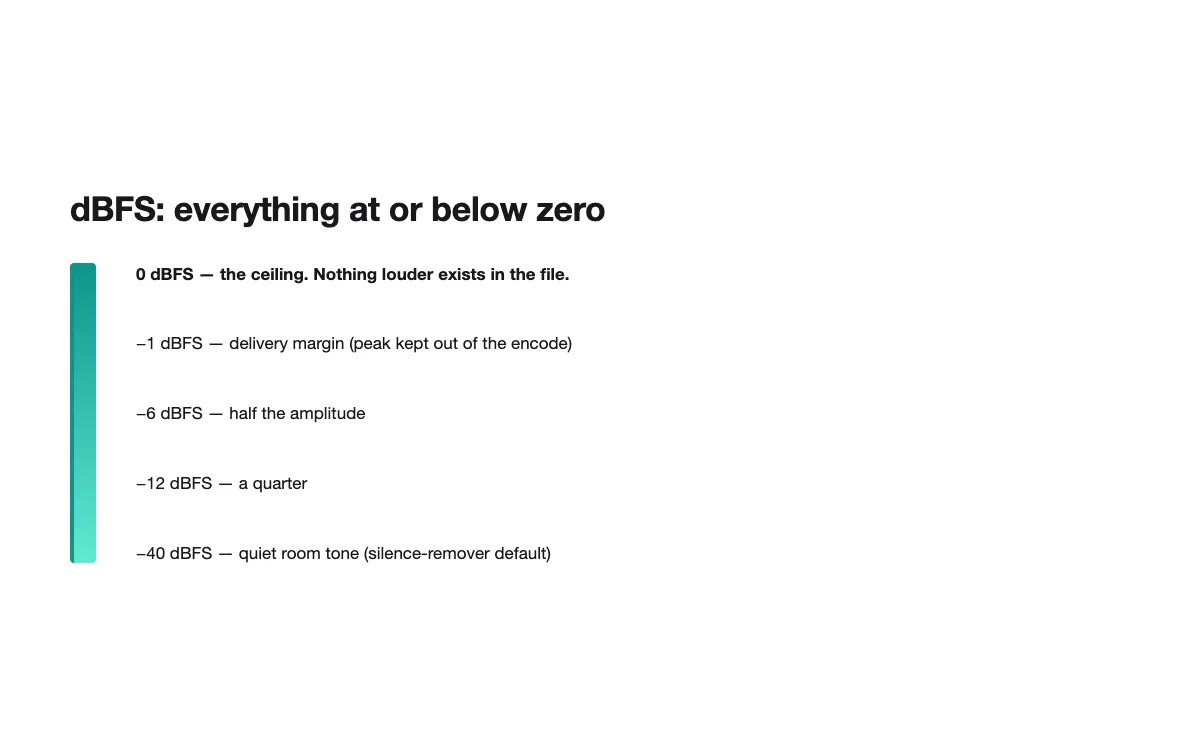
Why everything is negative
Analog level can keep climbing; a console knob keeps turning. A digital file cannot: the sample that holds the wave is a number with a maximum, and that maximum is the scale. Once level is measured against that maximum, “louder than the loudest” does not exist, so the minus signs are built into the unit. Audio at −3 dBFS is not quietly broken; it is three decibels below the largest value the file can store, which is headroom, not deficiency.
The numbers you will actually meet
- 0 dBFS. The ceiling. A sample sitting here is at the largest value the format allows, and anything pushing past it clips in conversion.
- −1 dBFS. The delivery convention. Matching a loudness target stops here, so the encode that follows has room to work; the podcast loudness workflow holds this line.
- −6 dBFS. Half amplitude. A common safety margin, and the honest answer to “how far down should I leave the peaks”.
- −40 dBFS. Typical territory for quiet room tone. The silence remover uses it as the default threshold: a stretch under −40 dBFS counts as a candidate gap.
The decibel steps are logarithmic, and two of them are worth memorizing: −6 dBFS is half the amplitude, and −12 is a quarter. Every 6 down is half again.
The ceiling is also why clipping sounds the way it does. Push a conversion past 0 dBFS and the samples that cannot be represented get pinned to the wall, flattening the tops of the wave into a harsh crackle. The damage is arithmetic, not subtle: there is no value above the maximum for the file to hold.
What dBFS is not
It is not loudness. dBFS describes single samples against a ceiling; it says nothing about how the whole file weighs on a listener, which is what LUFS measures. A file can peak at −1 dBFS and still measure far from a loudness target, because one transient set the peak while the body of the audio sat low. Peak and loudness are different instruments, and normalize versus loudness matching draws that boundary in detail.
dBFS is also not a relative change. Turning something down by 3 dB is a move in decibels; the result sitting at −3 dBFS is a position on the scale. The unit gets used for both in real interfaces, and reading the label decides which one you are holding.
Where you set it yourself
Three controls on this site speak dBFS. The silence remover’s threshold (−60 to −20, default −40) decides what counts as a gap. The normalizer aims its peak at about −0.2 dBFS, the largest clean ceiling with a margin. The loudness meter reports the sample peak and holds −1 dBFS when matching a target. Knowing that 0 is the wall and everything else is room below it makes all three readable at a glance.
Sources
More hands-on walkthroughs in all guides.