How to Check Audio Bitrate — and Whether It Is Real
By Free Audio Editor · · How we test
The bitrate printed on an audio file — in its name, its tags, or a store listing — is a claim, and claims travel without the audio being re-checked. The two checks that test it both run in your browser with nothing uploaded: one uses arithmetic on the file size, the other looks at where the audio’s frequencies actually stop. This page shows both, on two files made for the experiment — an 8-second clip encoded at 320 kbps, and the same clip encoded at 128 kbps and renamed to claim 320 — so you can see what the difference looks like rather than taking a rule on faith.
First, the distinction that makes the checks necessary. The number you see is what the encoder wrote into the container. Nothing about the filename is verified by anything: a 128 kbps file renamed “song-320.mp3” plays perfectly and reports itself exactly the same way. What the bitrate number measures is how many bits each second of audio gets — and a second of audio that was encoded at 128 kbps stays a 128 kbps second no matter what the label says.
Method 1: the file size does not lie
Bitrate is a rate, and a rate is always testable against the amount of stuff that actually arrived:
true average bitrate (kbps) ≈ file size in bytes × 8 ÷ duration in seconds
The experiment’s two files make it concrete. The genuine 320 kbps encode is 322,917 bytes over 8.0 seconds — 322,917 × 8 ÷ 8.0 = 323 kbps, matching its label. The renamed file is 129,212 bytes over the same 8.0 seconds — 129 kbps, whatever its name says. The arithmetic also gives you the quick per-minute estimates worth memorizing: a real 320 kbps MP3 weighs about 2.4 MB per minute, and a 128 kbps MP3 about 1 MB. A “320” album whose tracks average 3.5 minutes a piece and 4 MB a track is not 320.
One honest limit: the division gives the true average. A VBR file legitimately wanders — quiet passages spend fewer bits — so a VBR file can average below its label’s peak number without anything being wrong. For CBR files, which is what most store downloads and most “320” claims are, the arithmetic is exact.
Method 2: the spectrum shows where the audio stops
Lossy encoders save bits by throwing away frequencies the format deems least important, and how much they throw away scales with the bitrate. That leaves a fingerprint no filename can fake: a hard cutoff near the top of the spectrum. The spectrogram generator draws it, on your device, in one drop.
The experiment, run at each tool’s default settings (FFT 2048, logarithmic frequency axis, 20 kHz ceiling). First the genuine 320 kbps encode:
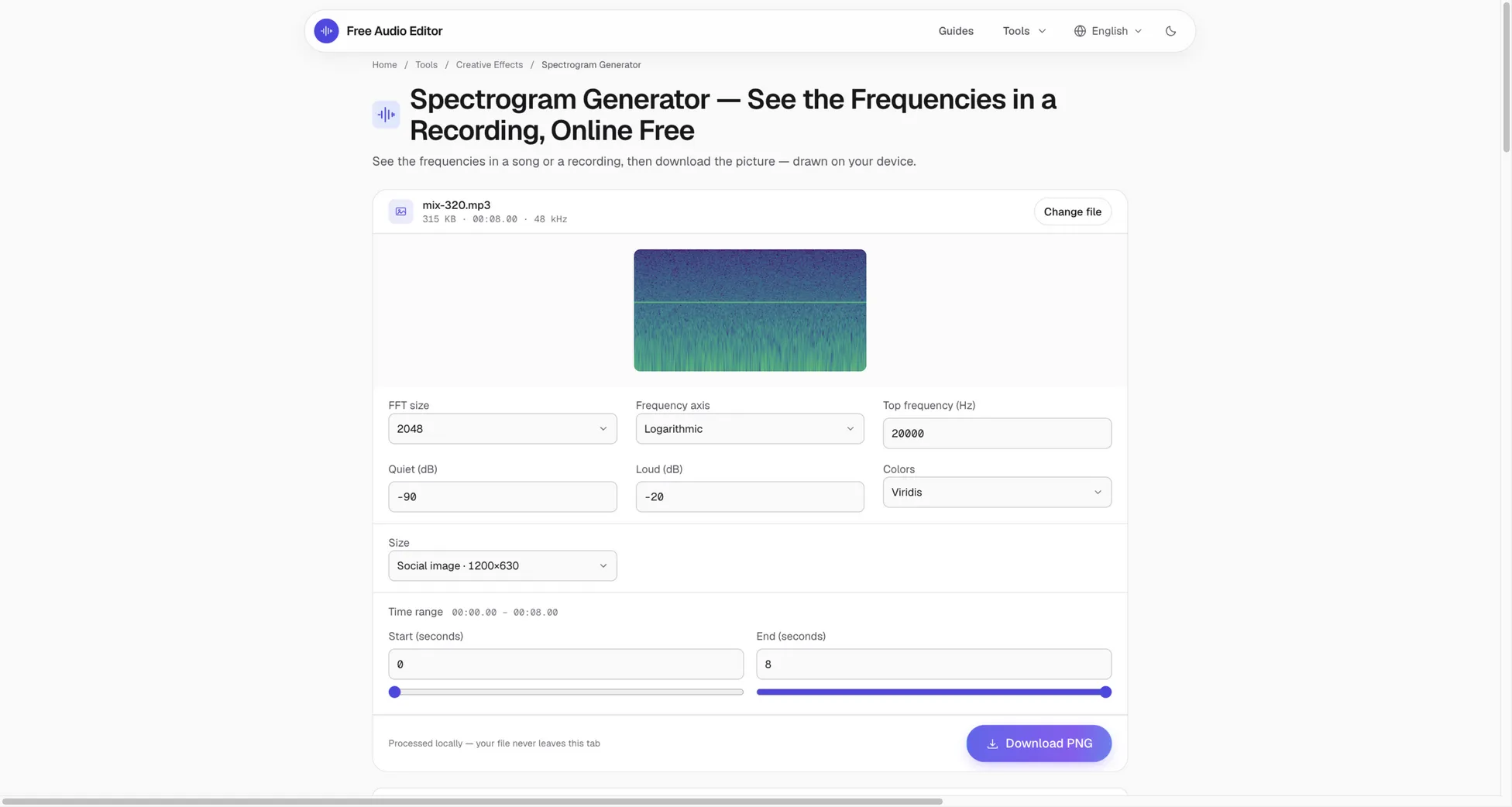
Energy reaches the top of the range. Now the renamed file — labeled 320 by its filename, actually the 128 kbps encode:
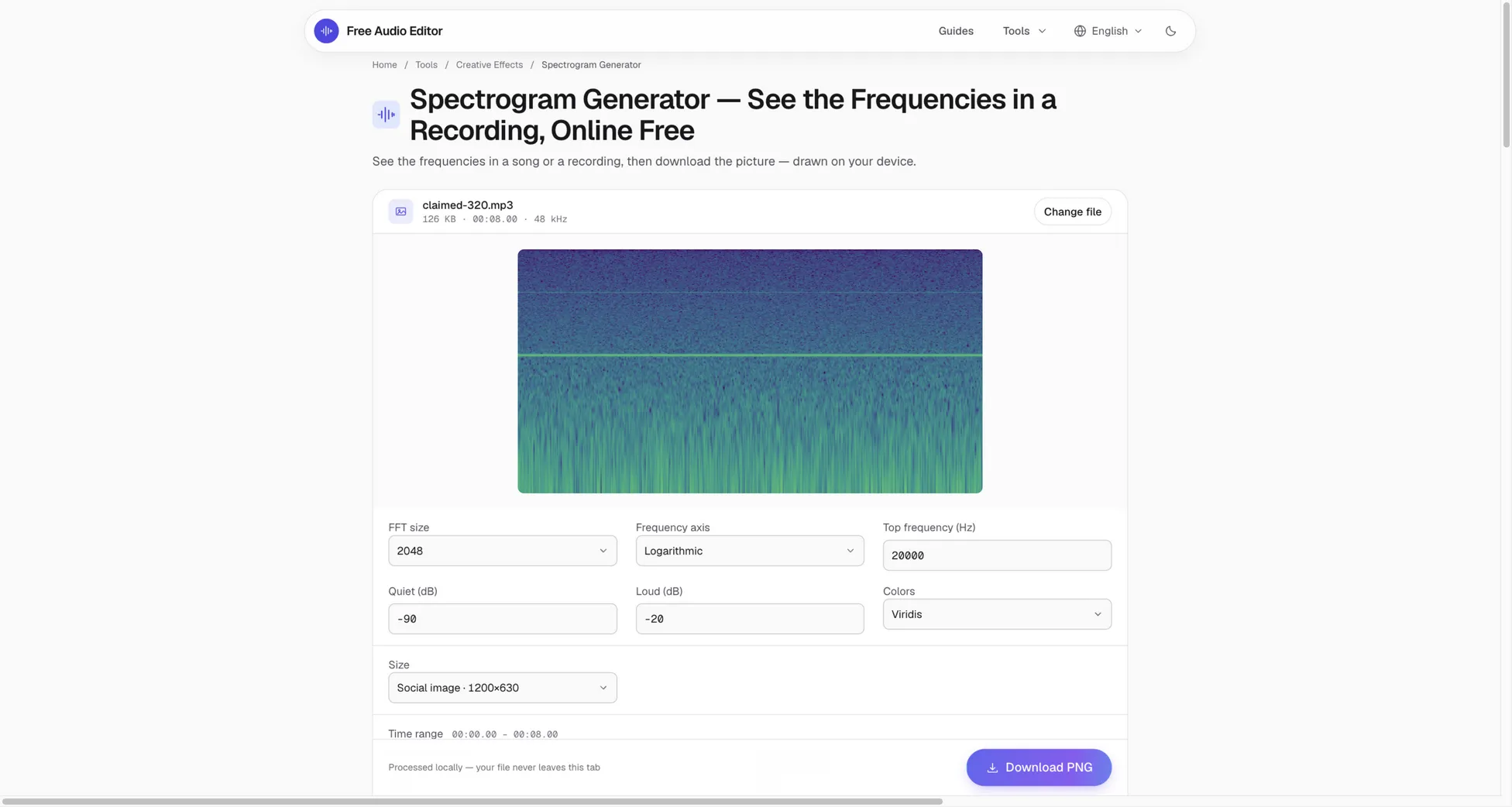
A flat shelf near 16 kHz, and silence above it — that shelf is the 128 kbps encoder’s work, visible no matter what the file is called. Note the header line in the screenshots too: 315 KB versus 126 KB, the size check agreeing with the spectrum before you even scroll.
Reading the shelf is approximate, and it is worth knowing what it can and cannot tell you:
- It separates the tiers reliably. 128 kbps cuts near 16 kHz; 320 kbps reaches roughly 20 kHz. A file claiming 320 with a 16 kHz shelf is not 320.
- It will not split adjacent tiers. Telling a 256 from a 320 by eye is not reliable — the shelf positions are too close.
- VBR walks the shelf. A VBR encode’s cutoff steps up in busy passages and down in quiet ones. A staircase is VBR behaving normally, not a fake.
- Lossless does not have a shelf. A real WAV or FLAC rolls off raggedly and naturally near the recording’s own limit, with low-level noise underneath — a flat line followed by dead silence is the lossy signature. What lossless formats promise covers why.
Is 320 kbps good, and does the number even matter?
320 kbps is the top of the MP3 standard, and as a listening target it is more than enough — in blind listening, most people cannot reliably pick it out from the lossless source. The honest framing is diminishing returns: speech is clean at 96–128 kbps, music distribution sits at 192–320, and archival skips the question with lossless formats or WAV. More bits on a lossy file buy smaller steps of the same kind of improvement, never lost data back.
That last point is where checking matters most. When a 128 kbps file gets re-encoded “up” to 320, nothing is recovered — this site’s own bitrate converter carries the sentence on its page: a higher number does not restore detail. The spectrum above proves it: the renamed file spent the same 128 kbps of information and only changed its name. The converter is for downscaling honestly — setting a file to the rate a destination actually needs.
If you use a checker site
Dedicated checkers exist and some are good — WhatsMyBitrate is open source and reads both the container and the spectrum, and this page’s method is essentially its test done by hand. The trade to know is where the file goes: a checker uploads your audio to a server for analysis, briefly and by policy, but it is no longer only on your device. For a purchased album that may not matter. For an unreleased mix, the two checks above keep the file in the tab. A desktop player such as VLC can also show a stream’s properties locally, free, on every major OS.
FAQ
How do I check if an MP3 is really 320 kbps?
Two checks, and neither needs an upload. First, the size arithmetic: file size in bytes, times 8, divided by duration in seconds — a real 320 kbps file lands near 320, and a relabeled 128 lands near 128. A 320 kbps MP3 also weighs about 2.4 MB per minute; a 128 kbps one about 1 MB. Second, the spectrum: on a spectrogram, a 128 kbps encode's energy stops near 16 kHz with a flat shelf, while a 320 kbps encode reaches roughly 20 kHz. Both checks run locally on this site.
Is 320 kbps good sound quality?
Yes — 320 kbps MP3 is the top of the MP3 format and, for listening, most people cannot reliably distinguish it from the source in a blind test. It is not lossless: the encoder still discards information, just less of it. For speech podcasts, 96–128 kbps is already clean; for music archival, a lossless format such as FLAC or WAV keeps every sample and sidesteps the question entirely.
What is a good bitrate for audio?
It follows the content and the destination. Speech: 96–128 kbps MP3 is the usual podcast range. Music distribution: 192–320 kbps. Music production and archiving: lossless (WAV or FLAC), because another edit or a future conversion should not start from lossy data. A higher number on a lossy file does not add detail back — a 128 kbps file re-encoded at 320 kbps is still a 128 kbps file wearing a bigger label.
Can you convert a 128 kbps MP3 to 320 kbps to fix it?
No. Encoding cannot recreate frequencies that were already discarded — the re-encode just spends more bits describing what is left, and the spectrum still stops near 16 kHz. This site's own bitrate converter states it plainly: a higher number does not restore detail. If the source file exists, re-encode from that; if it does not, the lost frequencies are gone.
Sources
More hands-on walkthroughs in all guides.