WAV vs MP3: Which File Do You Actually Need?
By Free Audio Editor · · How we test
Export WAV when the file will be edited, sampled, or handed to someone who asked for it by name. Export MP3 320 kbps when the file will be listened to and sent. Those two sentences settle most cases. The rest of this page is the arithmetic behind them, and the one trap in the middle: conversion is cheap in one direction and permanent in the other. The WAV to MP3 converter handles the cheap direction, in the browser.
The claim, and what the numbers support
Converter sites like to write that WAV has better quality than MP3. Half of that is a definition: a WAV stores every sample of the recording as uncompressed PCM. An MP3 stores a model of what the encoder expected a listener to hear, and the samples that did not fit the model are gone. Whether anyone can hear the difference is a separate question, and it is a question of degree:
- At 128 kbps, most listeners lose an A/B against the WAV on music with cymbals, reverb tails, or dense mixes.
- At 192 kbps, the gap narrows to trained ears on good equipment, in the frequency ranges where the encoder spends few bits.
- At 320 kbps, blind tests generally stop finding listeners who can tell the two apart.
Nobody can run a double-blind test on you through a web page, so read those as the honest shape of the curve, not a guarantee for your ears and your file. What is not a matter of degree: the discarded samples exist only in the WAV. If the destination changes later, the MP3 has nothing left to give.
The size math
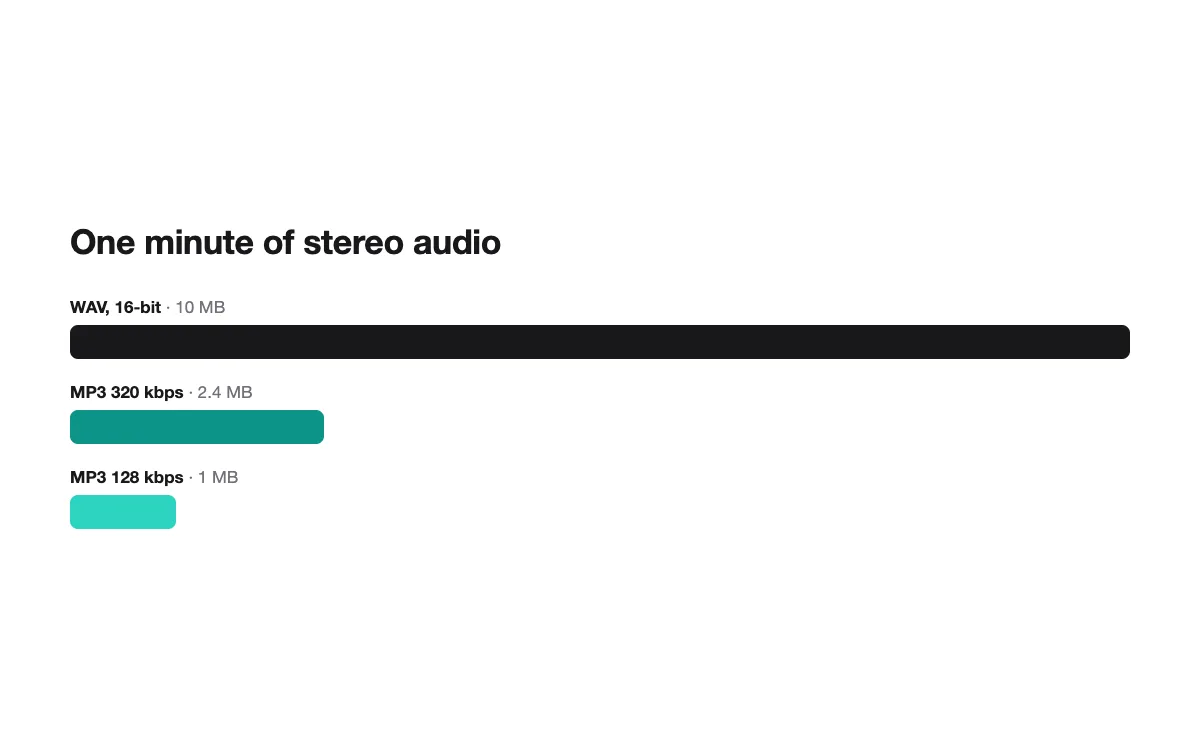
| WAV, 16-bit stereo | MP3 128 kbps | MP3 192 kbps | MP3 320 kbps | |
|---|---|---|---|---|
| Per minute | ~10 MB | ~1 MB | ~1.4 MB | ~2.4 MB |
| Half-hour set | ~300 MB | ~30 MB | ~42 MB | ~72 MB |
Mail systems bounce attachments between 10 and 25 MB, and chat apps have their own caps, which is why a raw WAV never survives the send. The same recording as a 192 kbps MP3 passes under every one of them. Compressing audio for email works the numbers case by case.
What each format is for
| WAV | MP3 | |
|---|---|---|
| Holds | Every sample, uncompressed PCM | A hearing model of the recording |
| Under editing | Cuts and fades without further loss | Every edit is a new lossy generation |
| Required by | DAWs, samplers, mastering, press kits | Nothing; everything plays it |
| Best at | Being the working copy | Being the file you send |
The trap in the middle
Decoding an MP3 to WAV hands you exactly what the MP3 contains, rewritten as 16-bit PCM at the original sample rate. The file gets bigger and the container is lossless, which feels like an upgrade. Nothing the encoder threw away comes back, and any converter claiming MP3-to-WAV quality restoration is not telling the truth. The decoded WAV is still the right file when an editor demands WAV; it just is not the recording you started from. If the original WAV still exists, use that and skip the decode.
Who should pick which
WAV is the working copy when the file will be cut, faded, normalized, or remixed; when it is a stem, a sample, or a podcast master; when a DAW, a sampler, or a client named it in the delivery spec; and when archival exactness is the point.
MP3 is the send copy when the destination is ears and inboxes: demos, references, attachments, and phone storage. Use 128 kbps for voice, 192 kbps for general listening, and 320 kbps when unknown equipment will be the judge.
Two follow-ups the table does not settle:
- Is FLAC the middle ground? Partly. FLAC compresses a WAV losslessly to roughly half the size and unpacks back to the identical samples, which makes it a good archive format. It is not as universally playable as MP3, and the browser pages here accept it on the way in.
- Does 320 kbps future-proof a file? No. Lossy is a one-way door. When a file matters and the source exists as WAV, keep the WAV alongside the MP3.
Two real destinations
Uploading to a platform. YouTube, Spotify-class streamers and podcast hosts re-encode whatever arrives, so their transcode is the last word on quality. Feed them the best file you have: the WAV, or the highest-rate MP3 if size blocks the upload. Sending a 128 kbps MP3 to a platform that will re-encode again doubles the loss for no benefit.
Voice recordings. A voice memo exists to be sent, so MP3 128 kbps is the right default. An interview or a podcast take is a working copy you may cut, level, and re-encode, so record and keep it in WAV until the final export. The podcast delivery numbers are in what LUFS a podcast should be.
The order that loses least
- Keep the WAV as the working copy.
- Do every edit there: cut, fade, level.
- Encode the MP3 once, at the end, at the rate the destination needs.
Both directions have a page here. WAV to MP3 is the final encode, and MP3 to WAV is the decode an editor demands. The editing workflow, including the honest cases where the MP3 is already enough, is in how to edit a WAV file.
Sources
More hands-on walkthroughs in all guides.